

In the Klarna payment driver there are two types of flows: Dynamic QR Code and Static QR Code.
Dynamic Qr Code
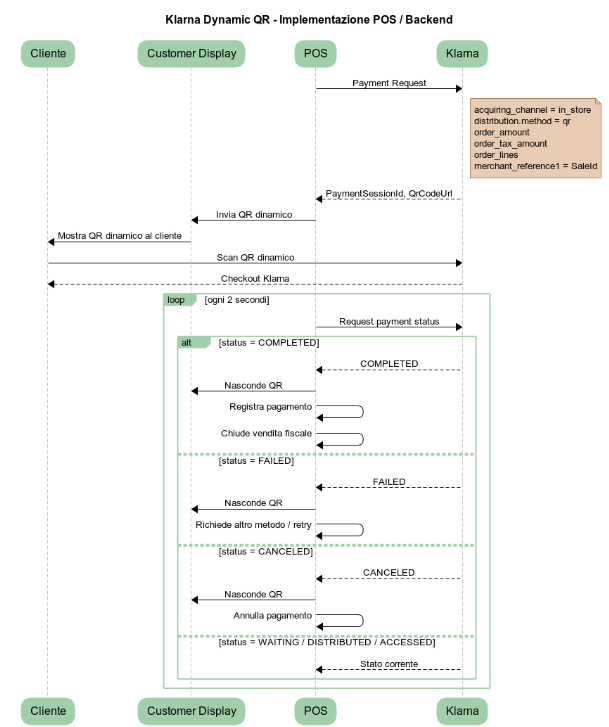
In the dynamic QR code flow, each transaction made with Klarna generates a unique QR code that will then be used by the customer in-store via their own smartphone.
Static Qr Code
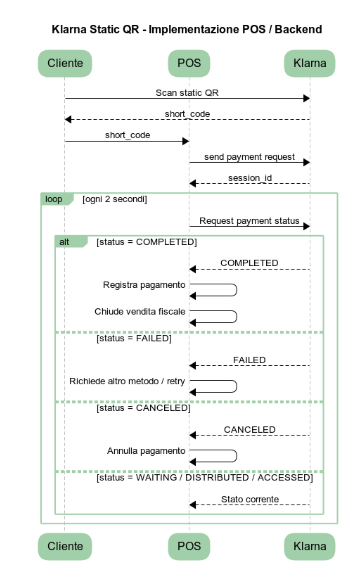
A printed QR code will be displayed in the store and scanned by the customer using their own smartphone.
Once the QR code is scanned, a code will appear on the customer's phone that must be communicated to the shop assistant and entered into Klarna's payment flow.
Parameters
|
Name |
Description |
Sample |
|---|---|---|
|
Username |
Username for authentication to Klarna Service |
2f348b40-9a79-4883-a5b4-79d81a0103e4 |
|
Password |
Password for authentication to Klarna Service |
|
|
Staging |
|
True |
Phases - Method PAY Only
The Klarna Driver uses Phases for payments, because the payment transaction is done in two steps.
Methods Refund and Void do not use Phases
Step 1 - Send Payment Request
Phase: BEGIN
It creates a Payment Request.
In the Request you must specify, in case of static Qr Code, the short code displayed on the smartphone of the customer in the node Attributes.
The response will return in the node TraceAuditId the Session Id that will be used in the following calls.
In the node PaymentLink, in case of dynamic Qr Code, it will return the URL with the Qr Code that must be shown.
Phase: DO
It verifies if the payment has been accepted by the Shopper. It must receive, in the node Attributes, the Session Id generated in Phase BEGIN.
In the node PaymentLink, in case of dynamic Qr Code, it will return the URL with the Qr Code that must be shown.
This phase must be called every 2 seconds until the transaction will be COMPLETED or CANCELED.
Phase: COMMIT
There is no COMMIT in the Klarna flow so there is no need to do a COMMIT. In case you want to execute the COMMIT, please note that this phase will always returns Success
Phase: ROLLBACK
It cancels a pending payment.
It must receive, in the node Attributes, the Session Id generated in Phase BEGIN
|
Version |
Release Date |
Notes |
Download |
|---|---|---|---|
|
1.01 |
09/06/2026 |
Initial Version |
|